



Updated November 2026
Your logo can go in seven places on the costume, in a small or large format depending on the position. Send it as a vector file (SVG, AI, EPS or PDF) or, failing that, as a large PNG. The quote confirms the position and size before production.
Where to place the logo
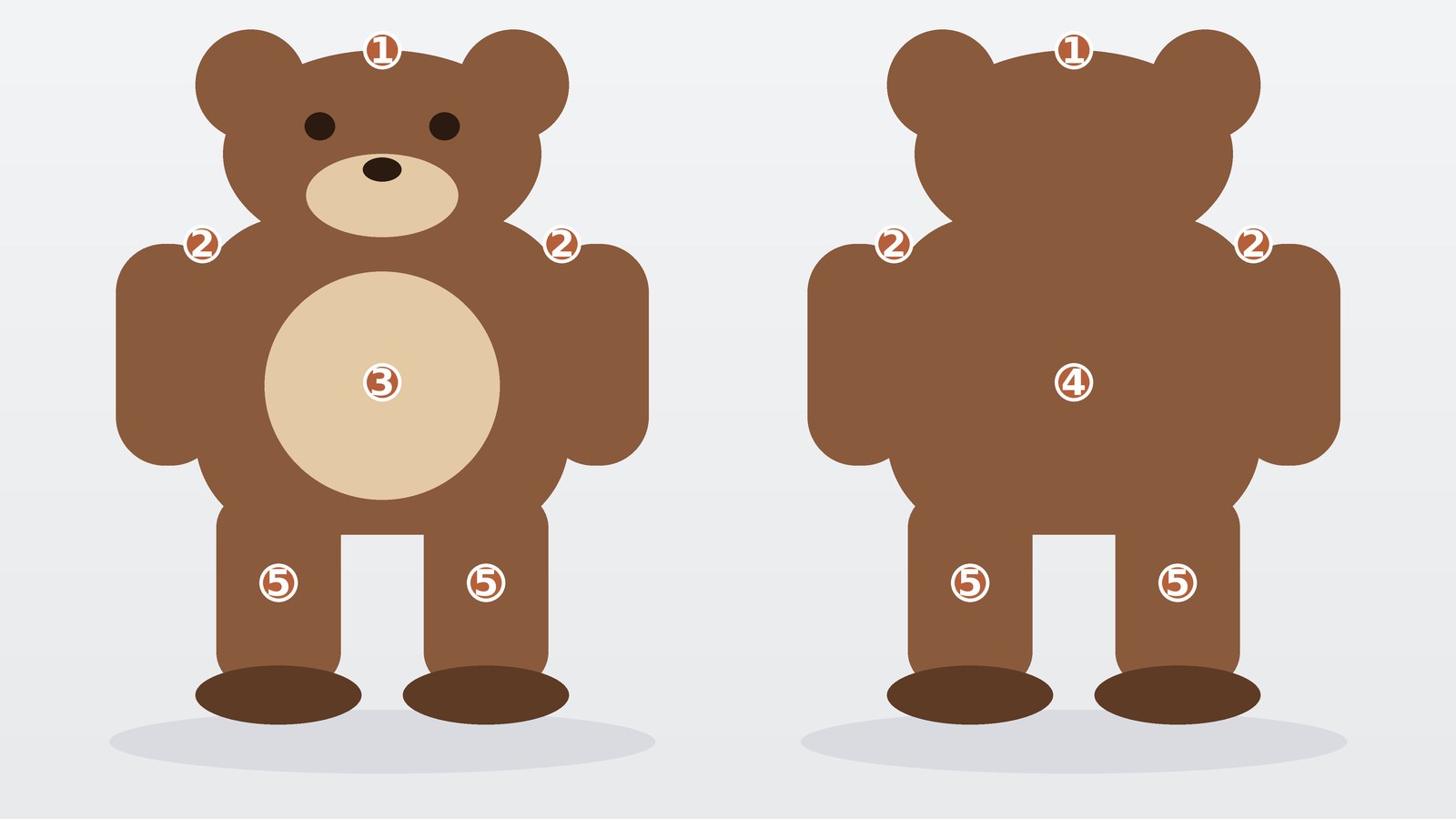
- Head or hat: very visible from a distance, ideal for a simple logo.
- Shoulders (two logos): clearly seen from the side and in group photos.
- Front: the logo stays readable in front-facing photos. Small or large format.
- Back: useful when the mascot walks in front of the audience. Small or large format.
- Knees (two logos): a discreet detail that complements a main logo.
Which files to send
- A vector file (SVG, AI, EPS or PDF): this is the best choice, as it keeps sharp edges at every size.
- Failing that, a PNG or JPG at least 1,000 pixels wide, not blurry and showing the whole logo.
- The colours as HEX, RGB or Pantone codes, if you have them. Otherwise we pick the colours from your file.
Tips for a sharp result
- A simple logo with few colours and thick shapes stays readable from a distance.
- Small text and very thin lines get lost on fabric. We point this out on the sketch.
- Avoid placing the logo on an area of a colour very close to its own: contrast makes it readable.
Logo or text?
The logo and the text are selected separately on the product page. You can add a name or a slogan on the back, the front or the head, in addition to a logo.
Frequently asked questions
Can I put several logos on the same costume?
Yes. Each position is selected separately on the product page. List them all in the quote.
I only have a low-quality file. What should I do?
Send it anyway. We will tell you whether it can be used and, if not, what to provide. Our team can also redraw a simple logo.
Will the logo be identical to my file?
It stays faithful to the design and the colours. The fabric sometimes means simplifying very fine details. You approve the result on the sketch before production.